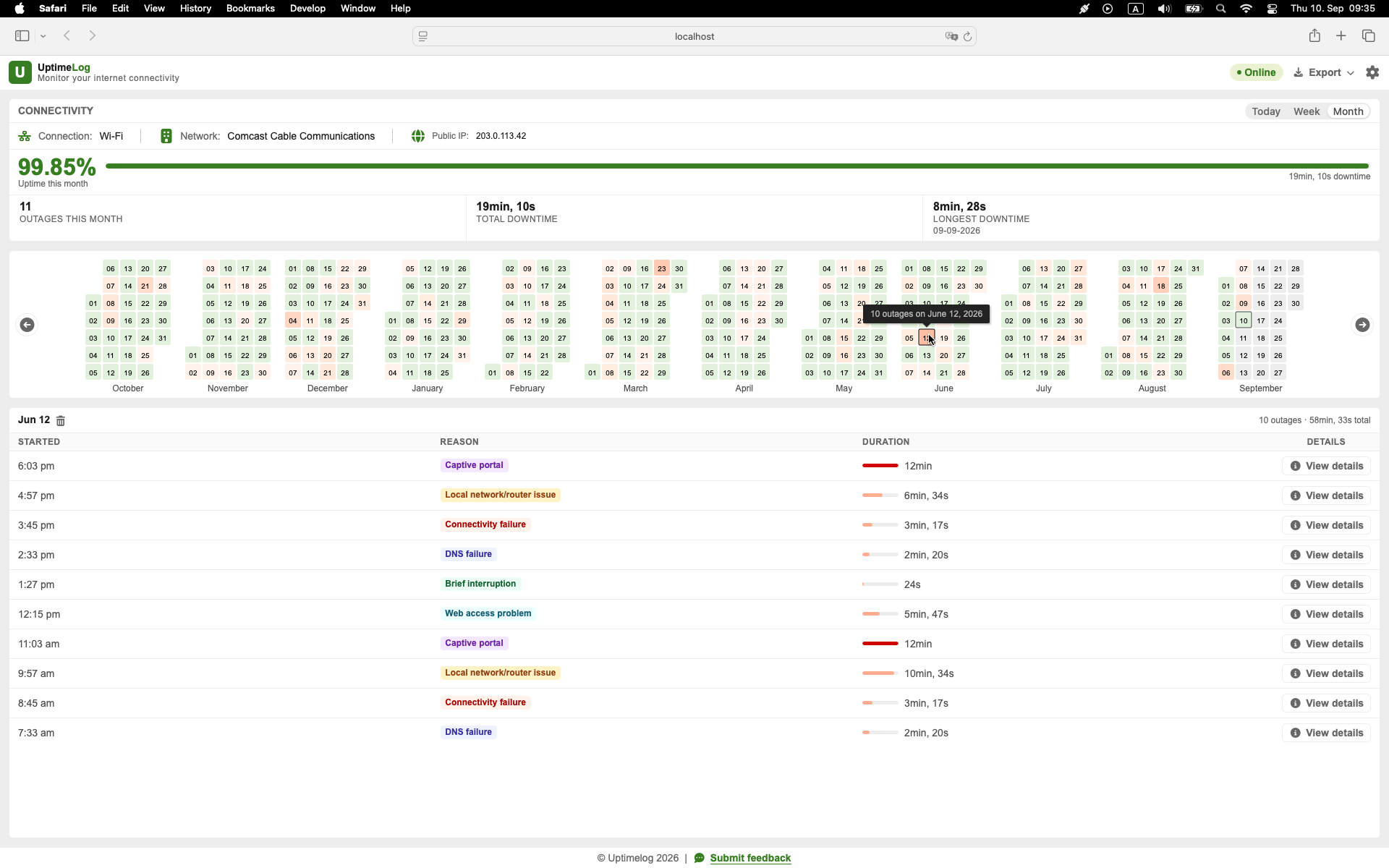
You do not need to produce a giant technical log. A short summary, a chronological outage list, and a few details about your setup are usually more useful than hundreds of screenshots or thousands of raw ping lines.
Be precise about what you are documenting
An outage monitor running on a Mac observes connectivity from that Mac. It can establish that the computer could not reach its monitored internet destinations during a particular period.
It does not automatically establish why. The failure could be in the Mac, Wi-Fi, Ethernet adapter, router, modem, ISP, upstream network, DNS, or monitored destination.
Use wording such as:
My Mac observed repeated loss of internet connectivity during the attached monitoring period.
Avoid claiming:
This report proves the ISP caused every outage.
That distinction makes the report more credible, not less useful.
Record each outage as one event
For every detected interruption, keep:
- start date and time;
- recovery date and time;
- duration;
- connection type, such as Wi-Fi or Ethernet;
- whether other devices were affected;
- whether the router remained reachable;
- public IP and ISP or network-provider information when available;
- notes about calls, streaming, downloads, or other visible symptoms.
Consecutive failed checks should be grouped into one outage event. Do not present every missed request as a separate outage.
If you need to create the underlying history first, read How to Log Internet Disconnections on a Mac.
Monitor long enough to show whether the problem repeats
One failure may be real, but a recurring pattern gives support staff more to work with. Choose the observation period based on frequency:
- several drops per hour: monitor for a few hours;
- roughly one drop per day: monitor for several days;
- unpredictable weekly problem: monitor for one or two weeks;
- time-specific problem: include the period before, during, and after the usual failure window.
Document the monitoring start and end time, and separate Mac sleep or shutdown from confirmed internet downtime.
For a complete observation plan, see How to Monitor an Internet Connection Over Several Days.
Check whether the problem affects more than one device
When possible, compare another phone or computer on the same network at the exact time of an interruption.
- If every device loses connectivity, say so.
- If only the Mac is affected, say so.
- If Wi-Fi fails but Ethernet remains stable, include that distinction.
- If the router becomes unreachable, record it.
- If the router remains reachable while public destinations fail, record that too.
Do not omit observations that weaken your initial theory. A factual record is more useful than a document written only to blame one party.
Turn the event history into a short summary
Start the report with information a support agent can understand quickly:
| Summary field | Example |
|---|---|
| Monitoring period | 7 days |
| Observed outages | 14 |
| Total observed downtime | 18 minutes 42 seconds |
| Longest outage | 4 minutes 11 seconds |
| Connection type | Wi-Fi and Ethernet tested |
| Pattern | Most failures between 18:00 and 21:00 |
The summary should lead to the complete event list, not replace it. Total downtime alone can hide whether you had one long outage or dozens of short interruptions.
Attach the detailed outage list
Include one row per interruption with at least its start time and duration. Recovery time and connection details make the list more useful.
Exact timestamps let the ISP compare your observations with modem, line, access-network, or maintenance records. Include your time zone, especially if the provider's support team or systems use another one.
Do not attach an unexplained raw file if you can provide a readable summary first. Put the most important information on the first page and keep the detailed events behind it.
Include useful setup information
Add a short environment section:
- service address or account reference only through the provider's secure support channel;
- ISP plan or access type, if relevant;
- modem and router model;
- Mac and macOS version;
- Wi-Fi or Ethernet;
- adapter or hub model, if used;
- whether the same failure affected other devices;
- troubleshooting already completed;
- dates of router restarts or hardware changes.
Do not publish this information on a public forum without removing personal and network-identifying details.
State what the report can and cannot establish
A short methodology section should say:
- which device performed the monitoring;
- which period was observed;
- that the device must be awake and running to test connectivity;
- what kind of destinations or checks were used;
- how failures were grouped into outage events;
- that local and upstream causes may produce the same observed symptom.
This prevents the report from appearing more certain than the underlying test allows.
Create the report with UptimeLog
UptimeLog runs in the background on a Mac and records detected internet interruptions with timestamps, duration, recovery time, and connection details.
UptimeLog Pro can export a PDF report designed for reading and a CSV export for sorting or further analysis. Pro is a $19 one-time purchase. Basic monitoring and the latest five days of history are free.
macOS 12+ · Notarized by Apple · Free basic monitoring
Write a concise support message
Use a short message and attach the report:
Hello, I am experiencing recurring internet interruptions. I monitored the connection from a Mac between [start date] and [end date]. During that period, the Mac observed [number] outages, totaling [duration]. The longest interruption lasted [duration] at [time and time zone]. [Other devices were also affected / only this Mac was affected]. I have attached the summary and detailed event log. Could you compare these timestamps with your connection or line records?
Replace every bracketed field. Do not send the template unchanged.
Keep the original data
Save:
- the generated report;
- the original event history or CSV;
- the date you contacted support;
- the ticket number;
- the provider's response;
- any modem, router, or line changes made afterward.
If the problem continues, a later report can show whether the frequency changed after the intervention.
Create your outage record
Start with several days of monitoring, summarize the pattern, and attach the detailed events. Describe the report as evidence of outages observed from your Mac-not automatic proof that the ISP caused them.